📞 Contact Seller
🔒 Login to Send MessageOR
Phone
Click to reveal
👁️ Show
WhatsApp
Click to reveal
👁️ Show
Telegram
Click to reveal
👁️ Show
Email
Click to reveal
👁️ Show
✓ Pros
- Competitive pricing in Kenyan market
- Currently in stock and available
- Compatible alternative at lower cost
- Clear page yield information provided
✗ Cons
- Third-party product - verify compatibility
- Check product details before buying
/product/40/9943523/1.jpg?0396)
/product/44/8462603/1.jpg?1686)
/product/81/3013971/1.jpg?4710)
Kyocera TK-5230K Toner Cartridge
🔒 Login to Save
Get high-quality prints with Kyocera TK-5230K toner cartridges. Compatible with Kyocera printers, these cartridges offer reliable performance. Ideal for office use in Kenya
Key Benefits
High page yield
Vibrant color prints
Reliable performance
Cost-effective
Best Price
KSh 3,000
Best deal
Compare Retailers
Singular Office Technologies
Check at checkout
3,000
🔔 Get Price Drop Alert
We'll email you when the price drops below KSh 3,000
📊 Price History (Last 30 Days)
| Date | Price | Change | Trend |
|---|
Features
What's in the Box
Specifications
Reviews
FAQs
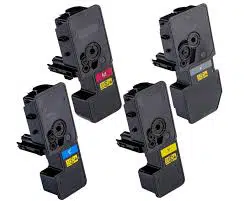
Kyocera TK-5230 Toner Cartridge
Part Numbers:
Black: 1T02R90NL0
Cyan: 1T02R9CNL0
Magenta: 1T02R9BNL0
Yellow: 1T02R9ANL0
Page Yield:
Black: Approximately 2,600 pages (ISO/IEC 19798)
Colors (Cyan, Magenta, Yellow): Approximately 2,200 pages each (ISO/IEC 19798)
Compatible with:
Kyocera Ecosys M5521cdn
Kyocera Ecosys M5521cdw
Kyocera Ecosys P5021cdn
Kyocera Ecosys P5021cdw
The Kyocera TK-5230 Toner Cartridge works with your laser printer to deliver quality prints. Containing microfine black toner. ThisKyocera TK-5230K cartridgeprints crisp, clear text and images for office documents. Capable of handling heavy workloads and large print volumes effectively. this Kyocera TK-5230K works with speed, efficiency, and accuracy. highly reliable technology ensures that Kyocera TK685 toners are the ideal office accessory.
Manufacturer Part No.:TK-5230, TK5230, TK-5230K, TK-5230C, TK-5230M, TK-5230YDuty Cycle: Approx. 2,600 black / 2,200 colour pages @ 5% average coverageGroup: Full sets of toner cartridgesBrand:KyoceraColour: High Capacity Black & ColourProduct Type: Toner
ECOSYS P5021cdn
ECOSYS P5021cdw
ECOSYS M5521cdn
ECOSYS M5521cdw
Box contents not listed yet.
No specifications available yet.
Log in to post a review.
Is this compatible with my printer?
+
Check the product specifications for compatible printer models. Always verify compatibility before purchasing to ensure the ink/toner works with your specific printer model.
How many pages can I print with this?
+
Page yield varies by cartridge/bottle. Check the specifications for estimated page yield. Actual yield depends on print content, coverage, and print settings.
Is this original or compatible ink/toner?
+
Product description will indicate if it's original manufacturer ink or compatible third-party ink. Original cartridges typically cost more but guarantee compatibility, while compatible options can offer savings.
How do I install the ink/toner?
+
Installation process varies by printer model. Most modern printers have easy-access ink tanks or cartridge slots. Refer to your printer's manual or the product's "What's in the Box" section for installation guides.